Retro Vibe Video Capture is professional video capture software for digitizing MiniDV, Digital8, Hi8, Video8, VHS, VHS-C, and S-VHS tapes on Windows. Connect your DV camcorder via FireWire or any USB capture device and save broadcast-quality AVI files to your hard drive. Purpose-built for tape digitization — not repurposed streaming software.
Digitize Your Tapes
Before They Fade
Connect your DV camcorder via FireWire or any USB capture device. Full transport control, live preview with audio, auto scene split. Broadcast-quality AVI output. Works on Windows XP through Windows 11.
Why Choose This Video Capture Software?
Most people who want to digitize old tapes end up wrestling with OBS Studio or abandoned software like WinDV and VirtualDub. These tools weren’t built for tape capture — OBS is designed for live streaming, WinDV hasn’t been updated since 2005, and VirtualDub lacks transport control entirely.
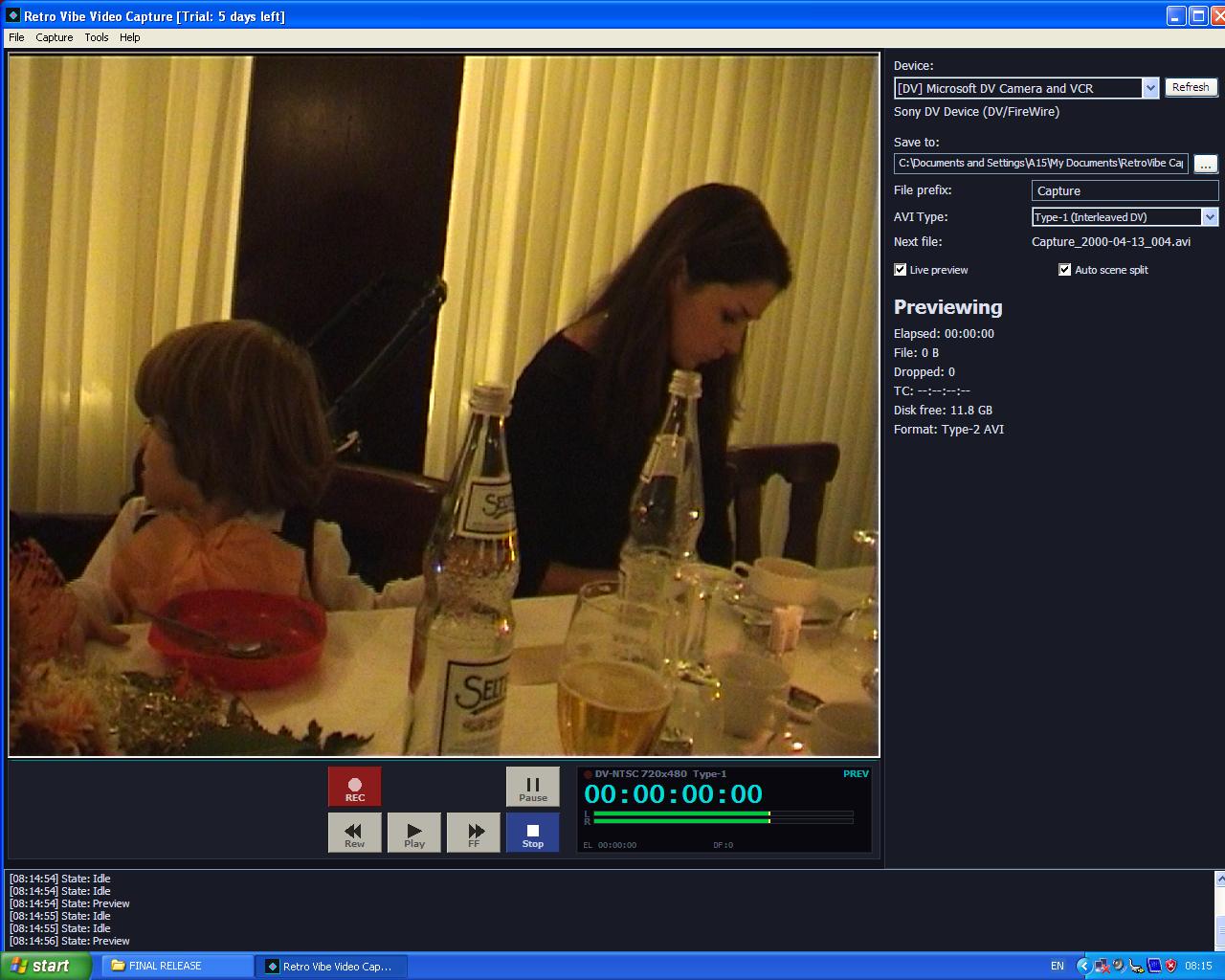
Retro Vibe Video Capture is video capture software built specifically for the tape digitization workflow. It connects to your DV camcorder over FireWire and gives you full transport control — play, pause, rewind, and fast-forward your tapes directly from the app. For analog formats like VHS and Hi8, plug in any USB capture device and the software auto-detects it, selects the best resolution, and gives you live preview with audio so you can hear exactly what’s being recorded.
The auto scene split feature detects timestamp gaps on DV tapes and saves each scene as a separate file — perfect for batch-digitizing entire tapes without manual splitting. Blank tape detection automatically stops recording when the content ends, so you can start a capture and walk away.
And unlike the free alternatives, this video capture software runs on everything from Windows XP to Windows 11. That old laptop with the FireWire card sitting in your closet? It works. The installer is under 2 MB with zero dependencies — no .NET, no Java, no runtime installers. Just download, install, and start capturing.
Every Tape Format. One App.
MiniDV
FireWire · 720×480 · DV codec
Digital8
FireWire · 720×480 · DV codec
Hi8
USB capture · 400 TV lines
Video8
USB capture · 240 TV lines
VHS / VHS-C
USB capture · 240 TV lines
S-VHS / S-VHS-C
USB capture · 400 TV lines
Video Capture Software Features
Full Transport Control
Control your DV camcorder directly from the app — Play, Stop, Pause, Rewind, Fast Forward. No more fumbling with tiny buttons on the camera. Sent via AV/C protocol over FireWire.
Live Preview with Audio
See and hear what you’re capturing in real time. Audio plays through your speakers during both preview and recording — so you always know the signal is coming through clean.
Auto Scene Split
Detects timestamp gaps on DV tapes and automatically splits your capture into separate files. Batch-digitize an entire tape and get individual scene files without lifting a finger.
Blank Tape Detection
Automatically stops recording when the tape hits unrecorded sections. Start a capture and walk away — the app knows when the content ends.
Type-1 & Type-2 AVI Output
Capture DV footage as Type-1 AVI (interleaved, best for archival and Adobe Premiere) or Type-2 AVI (split streams, best for DaVinci Resolve and FCPX). USB capture saves uncompressed AVI.
Broadcast Deck UI
Professional-grade interface with timecode display (HH:MM:SS:FF), stereo VU meters with peak hold, dropped frame counter, disk space monitor, and recording progress in the window title.
Snapshot (F7)
Grab a still frame from the live preview at any time — during preview or recording. Saves as BMP in your capture folder. Perfect for thumbnails or reference frames.
Capture-Safe Mode
Prevents screensaver, sleep, and display power-off during recording. Your two-hour tape won’t get interrupted by Windows deciding to take a nap.
<2 MB
Installer size
0
Dependencies
7
Languages
20+
Years of Windows
How This Video Capture Software Compares
| Feature | Retro Vibe | WinDV | VirtualDub | OBS Studio |
|---|---|---|---|---|
| Windows XP → 11 | ✓ | ✓ | ✓ | ✗ (Win 8+) |
| Live audio preview | ✓ | ✗ | ✗ | ✓ |
| AV/C transport control | ✓ | Limited | ✗ | ✗ |
| Auto scene split | ✓ | ✓ | ✗ | ✗ |
| Type-1 + Type-2 AVI | Both | Type-1 only | Custom | No AVI |
| USB capture support | ✓ | DV only | ✓ | ✓ |
| Blank tape detection | ✓ | ✗ | ✗ | ✗ |
| 7 languages | ✓ | ✗ | ✗ | ✓ |
| Actively maintained | ✓ (2026) | Abandoned | Abandoned | ✓ |
| Price | €9.99 | Free | Free | Free |
WinDV and VirtualDub are abandoned software with no updates since 2005–2010. OBS is designed for streaming, not tape capture.
Who Is This Video Capture Software For?
Families preserving home video memories. You’ve got a box of MiniDV tapes from the 2000s, a stack of Hi8 cassettes from the 90s, or VHS recordings of your kids growing up. This video capture software makes it easy to transfer all of them to your computer before the tapes degrade beyond recovery.
Small video transfer businesses. If you offer tape-to-digital services, the auto scene split and blank tape detection features let you batch-process tapes efficiently. Start a capture, walk away, and come back to neatly split scene files.
Retro video enthusiasts and archivists. Whether you’re preserving rare footage or building a digital library of vintage content, Type-1 AVI output gives you archival-quality captures that maintain the original DV data stream bit-for-bit.
Anyone with an old computer and a FireWire card. This is the only modern video capture software that runs on Windows XP through Windows 11. That old desktop or laptop with the built-in FireWire port? It’s all you need.
Read our complete guide to digitizing VHS tapes or learn about the differences between Hi8, Video8, and Digital8 formats.
Retro Vibe Video Capture
- All features — DV FireWire + USB capture
- Type-1 and Type-2 AVI output
- Full transport control (Play, Pause, Rewind, FF)
- Auto scene split + blank tape detection
- Live preview with audio monitoring
- Activate on up to 3 computers
- Works offline — no internet required
- Windows XP through Windows 11
- 7 languages with instant switching
- Free updates
System Requirements
- Operating System
- Windows XP SP2, Vista, 7, 8, 8.1, 10, 11
- Architecture
- 32-bit or 64-bit (runs via WoW64)
- RAM
- 256 MB minimum, 2 GB+ recommended
- Disk Space (app)
- 2 MB
- Disk Space (capture)
- ~13 GB/hour (DV) · ~72 GB/hour (USB uncompressed)
- DV Capture
- IEEE 1394 FireWire port + OHCI controller
- USB Capture
- Any DirectShow-compatible device (EasyCap, Elgato, AverMedia, etc.)
- Display
- 1024×768 minimum, 1280×720+ recommended
Your Tapes Won’t Wait
Magnetic tape degrades every year. Oxide shedding, sticky-shed syndrome, and magnetic decay are destroying your memories right now. Don’t wait until it’s too late.